Human-in-the-Loop Governance
Human-in-the-loop (HITL) governance lets operators require approval before an agent performs sensitive actions.
Why HITL Matters
Agents can draft, search, summarize, and prepare work quickly. Some actions still need explicit human confirmation:
- Sending external messages.
- Publishing public content.
- Writing files in sensitive locations.
- Triggering integrations with side effects.
- Running shell commands.
Action Classes
Approval settings use structured rules for action categories, individual actions, or exact account/resource targets. The runtime applies them before execution:
- Allowed: the agent can proceed.
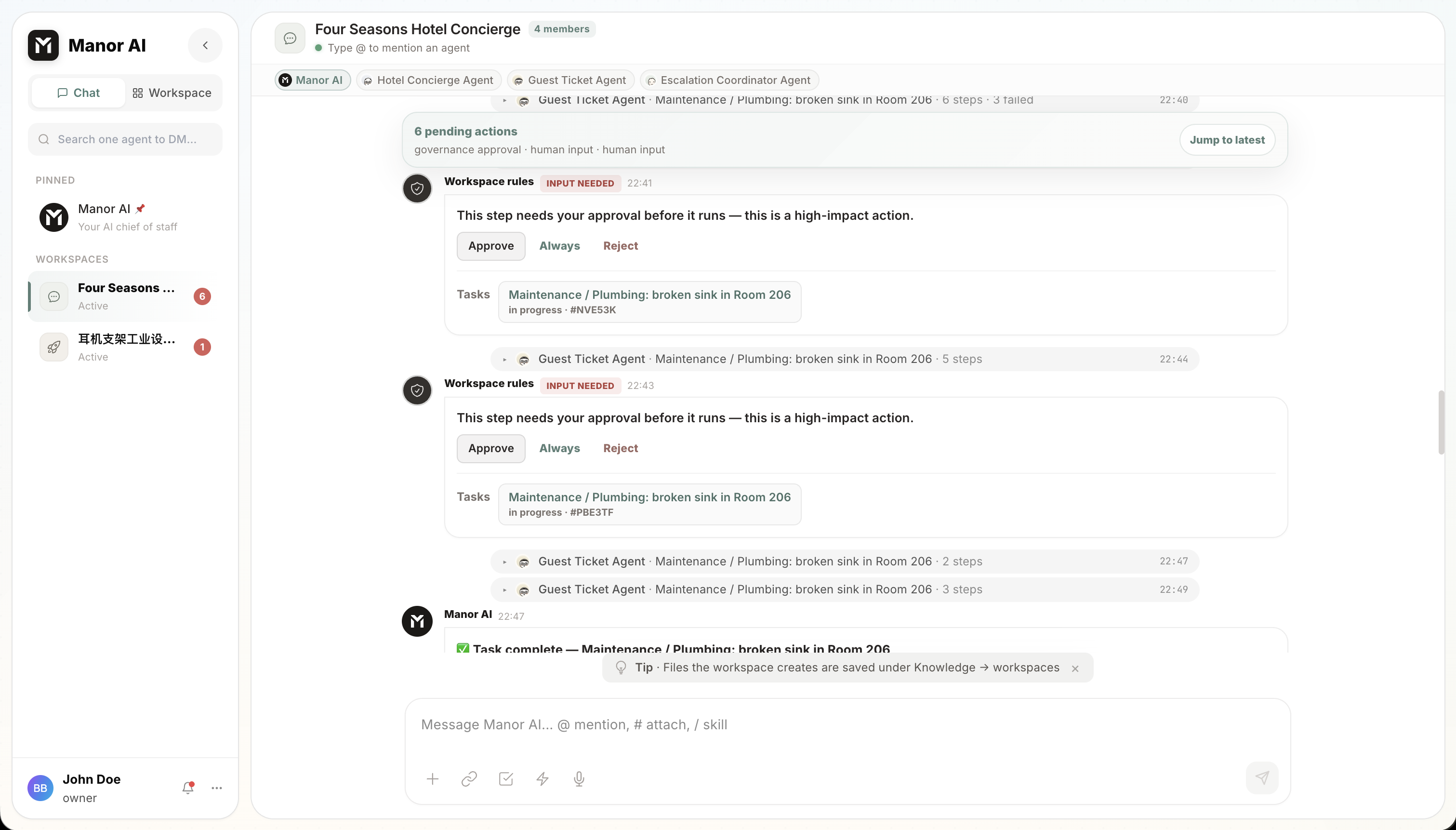
- HITL required: the agent pauses; a human reviews the exact action and payload, then approves or rejects.
- Blocked: the action is denied before the tool runs.
Chat, Tasks and Workflows share the same current approval policy:
| Mode | Default behavior when no explicit rule matches |
|---|---|
confirm_changes | Ask before changes and external actions. |
risk_based | Routine edits can run; external, destructive or unknown effects require approval. |
automatic | Authorized actions can run automatically, including unknown effects. |
Personal, Workspace and Room settings may follow the current account default or select a local mode. Account-level deny rules cannot be bypassed locally. No mode bypasses permissions, hard risk/budget limits, paused or deleted resources, pending decisions, or explicit Workflow review steps. Changing the mode does not approve an existing pending request.
Where Approvals Surface
Approvals meet you where the work happens:
| Surface | Behavior |
|---|---|
| Chat | An approval card renders inline; the run continues after your decision. |
| Tasks | An execution step shows as waiting on human input; use its approval controls for the pending decision. A generic retry is not approval. Approval-type tasks carry an approve / request-changes panel of their own. |
| Plans | A generated plan can require sign-off before execution (POST /api/v1/plans/{plan_id}/approve). |
| Workflows | Native tool/connector approvals pause the exact invocation and surface in run detail and Workspace Chat. Explicit wait review nodes still require the owner's decision; a follow-up node can create a time-boxed action grant at that scope. |
Operational Guidance
Start conservative. Require HITL for irreversible or externally visible actions. After you trust a workflow and account boundary, selectively loosen approval requirements for low-risk automation — action grants and per-rule changes let you do that without turning governance off wholesale.
Review the account default and local overrides in Execution & Approvals.
Workspace settings are available through
GET /api/v1/approval-settings/workspaces/{workspace_id}; previews and updates
check permissions and the current policy version before applying a change.
Correctable tool errors can be returned to the same agent loop for repair. Every new attempt re-enters authorization and approval checks; repair cannot skip waiting, cancellation, exhausted budgets, uncertain effects or strict checkpoint failures, and does not authorize replay of a completed effect.
Auditability
Approval prompts and tool calls leave evidence: what was requested, who approved it, and what happened next. Execution logs, the workspace activity feed, and run traces (with secrets scrubbed) make after-the-fact review possible without reconstructing events from memory.