Configuration
Configuration is read from environment variables. Start from .env.example:
cp .env.example .env
Every variable shipped in .env.example is documented on this page, grouped
the same way as the file. Defaults shown are the values in .env.example;
"unset" means the variable is empty by default and the related feature stays
off until you fill it in.
Required for Real Deployments
Change these before exposing Manor AI beyond local evaluation:
| Variable | Purpose |
|---|---|
JWT_SECRET_KEY | Signs user sessions. Use a long random value. |
DATABASE_URL | Async PostgreSQL connection string. |
DATABASE_URL_SYNC | Sync PostgreSQL URL used by Alembic. |
REDIS_URL | Redis cache and broker URL. |
MINIO_ACCESS_KEY / MINIO_SECRET_KEY | Object storage credentials. |
PUBLIC_BASE_URL | Public URL used by webhooks and generated media callbacks. |
APP_URL | Browser-facing web URL. |
Deployment Mode and Model Defaults
| Variable | Default | Notes |
|---|---|---|
DEPLOYMENT_MODE | oss | oss is self-hosted mode. Leave it as oss for every self-hosted deployment. |
LLM_MODEL | anthropic/claude-sonnet-4 | Default model id. Users and entities can override it in Settings. |
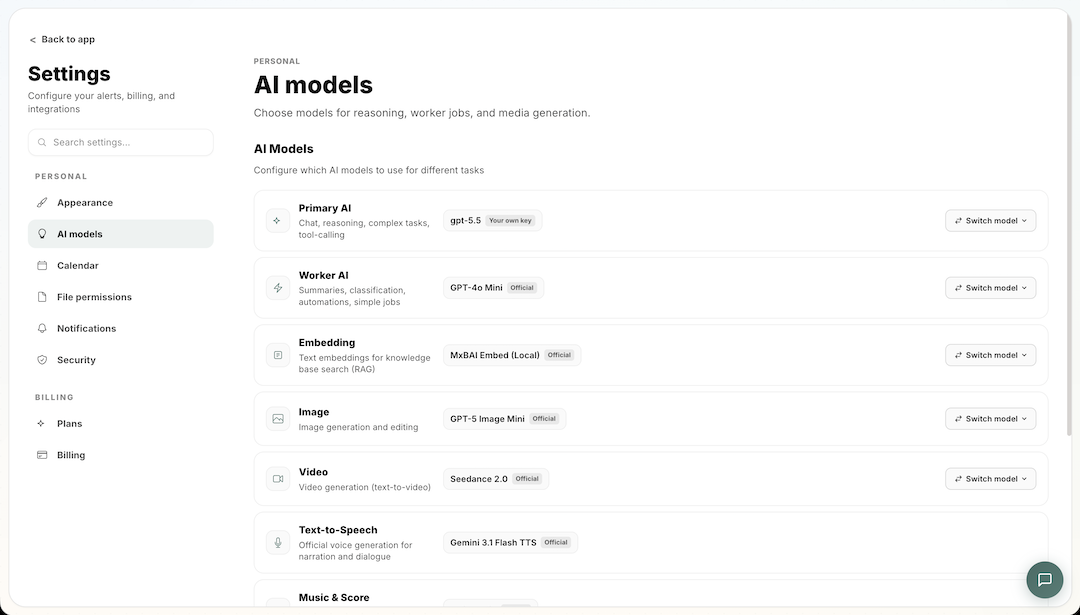
Self-hosted Manor AI is BYOK (bring your own key): model calls only run with provider credentials configured in Settings. Avoid baking model API keys into images or source control.
Live Voice Calls
Chat, Workspace Chat, and public Webchat include a Start voice call button beside the microphone input button. A call stays connected while you speak: pauses trigger responses, replies play in sentence-sized audio segments, and speaking again interrupts playback. The panel includes captions, mute, and end-call controls. Text stays in the same conversation; tools and approvals use the normal chat runtime. Tool-heavy turns can take longer to answer. Pausing a Workspace preserves direct Chat while keeping guarded actions paused; public channel calls require an active Workspace.
For self-hosted Realtime calls, configure a native OpenAI Primary AI BYOK in Account → Models. Speech-to-text and Text-to-speech role keys remain scoped to the turn-based STT/Chat/TTS path and are never promoted into a full Realtime credential. The server detects speech, calls the existing Chat runtime, and speaks its reply. Latency depends on the selected models and tools. The first sentence is synthesized separately; later audio is prepared during playback. The panel distinguishes speech recognition, Chat processing, and voice preparation, and shows the Chat reply before its audio is ready. Public Webchat uses its configured owner's credentials and billing scope, never a visitor's key.
Microphone access requires HTTPS, except on localhost. Custom reverse proxies
must allow WebSocket upgrades for /api/v1/audio/live and serve the app with
Permissions-Policy: microphone=(self). Keep document-preview frames restricted.
For an embedded Webchat, the parent page must also allow microphone access for
the chat origin; the generated embed script includes the iframe permission.
Audio is processed by the voice provider. The server saves conversation text, records voice usage through the shared audio billing path, and rechecks access during the call.
The shared speech path uses local speech detection to reduce background noise. Suspected speech temporarily pauses playback; recognized words confirm an interruption. An empty transcript resumes the paused audio, and completed replies stay visible in the call panel even when their audio is interrupted. The call panel shows microphone level and provides a Test speaker tone that does not send audio to a provider. If a call is silent, check the input meter, speaker test, browser output device and volume, then check the server's gateway connectivity.
Hanging up stops capture, cancels request preparation, and prevents new retries.
A speech gateway request already submitted may finish and have its usage recorded after the call ends.
Calls end when you hang up, leave the page, switch chats, lose access, or reach
the 30-minute session limit. Reconnect explicitly after a disconnect; completed
actions are not automatically replayed. The previous /chat/voice-session and
/chat/voice-save endpoints are replaced by the authenticated server relay.
Database
| Variable | Default | Notes |
|---|---|---|
DATABASE_URL | postgresql+asyncpg://manor:manor_secret@postgres:5432/manor | Async SQLAlchemy URL used by the API and worker. |
DATABASE_URL_SYNC | postgresql://manor:manor_secret@postgres:5432/manor | Sync URL used by Alembic migrations. Keep it pointing at the same database as DATABASE_URL. |
DATABASE_POOL_SIZE | 5 | Connections held open per API process. |
DATABASE_MAX_OVERFLOW | 2 | Extra connections allowed above the pool size under burst load. |
DATABASE_POOL_TIMEOUT | 10 | Seconds to wait for a free connection before failing. |
DATABASE_POOL_RECYCLE | 1800 | Seconds before a pooled connection is recycled. |
DATABASE_ADMISSION_LIMIT | 0 | Concurrent managed Session transactions per process/event loop. 0 preserves pool size + overflow − 1 (minimum 1) for local pools and direct-PostgreSQL workers. With PgBouncer it selects app 4 / worker 1; other application NullPool engines use 4. |
DATABASE_MAX_WAITERS | 14 | Maximum queued transactions when admission is full. |
DATABASE_ADMISSION_TIMEOUT | 2 | Maximum admission wait in seconds. Saturation returns HTTP 503 with detail.code=database_busy and Retry-After. |
DATABASE_HOLD_WARN_SECONDS | 5 | Log a long connection checkout with its request ID after this many seconds. |
DATABASE_STATEMENT_TIMEOUT_MS | 0 | Optional transaction-local PostgreSQL statement deadline in milliseconds. 0 preserves the database default. |
DATABASE_LOCK_TIMEOUT_MS | 0 | Optional transaction-local PostgreSQL lock-wait deadline in milliseconds. |
DATABASE_IDLE_TRANSACTION_TIMEOUT_MS | 0 | Optional transaction-local PostgreSQL idle-in-transaction deadline in milliseconds. |
Budget every API/chat replica and process: their pool ceiling is
sum(replicas × processes × (DATABASE_POOL_SIZE + DATABASE_MAX_OVERFLOW)).
Also include each Celery process's transaction budget, migration/operational connections and a safety
reserve below PostgreSQL max_connections. Celery uses disposable NullPool
engines; a conservative worker ceiling is concurrency × admission limit.
Admission is shared only within one event loop, not across worker processes.
Direct-PostgreSQL workers keep their legacy automatic budget (6 with the
default pool settings) despite using NullPool, so existing nested Sessions
are not reduced to a single permit. This is a compatibility default, not a
local connection pool. An explicit limit of 1 still cannot accommodate a
second Session while the caller holds its transaction.
With NullPool, a positive admission limit is independent of the unused
DATABASE_POOL_SIZE and DATABASE_MAX_OVERFLOW. For PgBouncer, budget client
slots as replicas × processes × admission limit, plus independent probes,
rolling-update surge, draining pods and jobs. PgBouncer's backend pools enforce
the separate global PostgreSQL connection ceiling. Bound its backend queue wait
as well; client capacity and backend capacity are different limits.
Admission lasts for a database transaction, not the lifetime of a request,
WebSocket, LLM call or file stream. With an actual local pool, the automatic
limit leaves one connection for bounded readiness probes when capacity is at
least two; explicit admission cannot exceed that pool's size + overflow.
NullPool probes use a separate single-slot gate. Overload is not an automatic replay
of writes; respect Retry-After and use the operation's idempotency contract.
Audit long-running task/approval lock protocols before enabling the optional
deadlines. They use transaction-local settings, including through PgBouncer,
and do not terminate slow LLM or sandbox work that has released its connection.
/health/deep in self-hosted mode reports pool checkout/long-hold counts,
transaction admission activity, waiting/rejected counts and maximum waits.
queue_full counts transactions rejected before entering the bounded queue;
wait_timeouts counts queued transactions that exceeded the admission deadline.
peak_active_transactions and peak_waiters show high-water marks for the
current process/event loop, not fleet-wide capacity. Restarting resets these counters.
Long-hold logs contain request IDs, not SQL arguments or credentials.
Redis
| Variable | Default | Notes |
|---|---|---|
REDIS_URL | redis://redis:6379/0 | Cache, Celery broker, rate-limit backend, and presence store. |
REDIS_MAXMEMORY | 0 | Memory cap for the Redis service. 0 means unlimited. For shared hosts a bounded value such as 512mb is safer. |
REDIS_MAXMEMORY_POLICY | noeviction | Eviction policy once the cap is hit. Pair a bounded REDIS_MAXMEMORY with allkeys-lru if you can tolerate cache eviction. |
Database /1 on the same Redis instance is used by JuiceFS metadata (see
Storage); keep /0 and /1 distinct
if you point Manor at an external Redis.
API Server Tuning
Single-server emergency controls. The defaults are conservative and safe for evaluation; measure CPU, p95 latency, and DB connections before raising them.
| Variable | Default | Notes |
|---|---|---|
API_WORKERS | 1 | Uvicorn worker processes. |
API_LIMIT_CONCURRENCY | 120 | Maximum concurrent connections per worker before requests are rejected. |
API_BACKLOG | 256 | Socket backlog for pending connections. |
API_TIMEOUT_KEEP_ALIVE | 5 | Keep-alive timeout in seconds. |
The shared WebSocket push manager uses at most 32 simultaneous sends per process and a two-second deadline for each send and failed-connection close. It serializes sends on each socket and resolves only the candidate users in the target Entity; that connection index does not cache authorization. Current membership, visibility and token versions are still checked before relaying content. Slow clients are closed; reconnecting clients reconcile with persisted messages. Realtime pushes remain best-effort, not durable delivery receipts. These bounds do not establish a supported user count: load-test real sockets, message rates, database latency and background jobs together before changing process, replica or connection budgets.
Rate Limits
All limiters are opt-in and disabled by default for local evaluation. Enable them on any deployment shared with real users.
| Variable | Default | Notes |
|---|---|---|
RATE_LIMIT_ENABLED | false | Master switch for the general API limiter. |
API_RATE_LIMIT_REQUESTS | 200 | Requests allowed per window per client. |
API_RATE_LIMIT_WINDOW_SECONDS | 60 | Window length for the general limiter. |
CHAT_RATE_LIMIT_ENABLED | false | Separate limiter for chat routes, which are the most expensive. |
CHAT_RATE_LIMIT_REQUESTS | 30 | Chat requests allowed per window. |
CHAT_RATE_LIMIT_WINDOW_SECONDS | 60 | Window length for the chat limiter. |
REDIS_RATE_LIMIT_ENABLED | false | Store limiter state in Redis so limits are shared across all API workers instead of per-process. Enable whenever API_WORKERS > 1. |
Degraded Mode
Emergency brake for overloaded deployments. When DEGRADED_MODE=true,
high-cost routes return 503 with code=degraded_mode while health checks,
config, login, and basic reads keep working.
| Variable | Default | Notes |
|---|---|---|
DEGRADED_MODE | false | Master switch. |
DEGRADED_DISABLE_CHAT_STREAM | true | While degraded, disable streaming chat. |
DEGRADED_DISABLE_SANDBOX | true | While degraded, disable sandbox execution. |
DEGRADED_DISABLE_MEDIA_GENERATION | true | While degraded, disable image/video generation. |
DEGRADED_DISABLE_LARGE_UPLOADS | true | While degraded, reject large uploads. |
The four DEGRADED_DISABLE_* switches only take effect while
DEGRADED_MODE=true; they let you choose which capabilities the brake covers.
Object Storage and Entity Filesystem
Manor AI uses MinIO for object storage and JuiceFS for entity-scoped
filesystem storage. The default Compose stack formats and mounts the JuiceFS
volume automatically via the juicefs-init service.
| Variable | Default | Notes |
|---|---|---|
MINIO_ENDPOINT | minio:9000 | S3-compatible endpoint. |
MINIO_ACCESS_KEY | minioadmin | Change for any shared deployment. |
MINIO_SECRET_KEY | minioadmin | Change for any shared deployment. |
MINIO_BUCKET | manor | Bucket for uploads and generated artifacts. |
MANOR_FS_ENABLED | true | Enables the per-entity filesystem (agent file tools, knowledge file sync). |
MANOR_FS_ROOT | /mnt/manor | Mount path used by the API and workers. |
JUICEFS_META_URL | redis://redis:6379/1 | JuiceFS metadata store. Uses Redis database /1. |
JUICEFS_STORAGE | minio | JuiceFS data backend type. |
JUICEFS_BUCKET | http://minio:9000/manor | Object store bucket URL for JuiceFS data blocks. |
JUICEFS_ACCESS_KEY | minioadmin | Keep in sync with the MinIO credentials. |
JUICEFS_SECRET_KEY | minioadmin | Keep in sync with the MinIO credentials. |
Sandbox
| Variable | Default | Notes |
|---|---|---|
SANDBOX_SERVICE_URL | http://sandbox:8000 | URL of the isolated code-execution service. |
SHELL_SANDBOX_ENABLED | true | Allows agents to run shell commands inside the sandbox service. Set false to disable shell execution entirely. |
See Sandbox operations for what runs inside the boundary.
Authentication
| Variable | Default | Notes |
|---|---|---|
JWT_SECRET_KEY | change-this-to-a-random-string | Must be replaced before any shared deployment. |
JWT_ALGORITHM | HS256 | Token signing algorithm. |
JWT_EXPIRE_MINUTES | 1440 | Access-token lifetime, capped at 24 hours. Remember me uses a separate 30-day browser session. |
GOOGLE_CLIENT_ID / GOOGLE_CLIENT_SECRET | unset | Enables "Sign in with Google". Create a Web OAuth client in Google Cloud Console. |
VITE_GOOGLE_CLIENT_ID / VITE_GOOGLE_DRIVE_API_KEY | unset | Enables the Google Drive Picker on the Knowledge page. Requires the Google Picker API and Google Drive API enabled in your Google Cloud project. |
Email (SMTP)
Outbound email powers invites, verification codes, notifications, and email-channel replies.
| Variable | Default | Notes |
|---|---|---|
EMAIL_ENABLED | false | Master switch. Leave off if you have no SMTP server; flows that would email fall back silently. |
SMTP_HOST | unset | SMTP server hostname. |
SMTP_PORT | 587 | Standard STARTTLS port. |
SMTP_USER / SMTP_PASSWORD | unset | SMTP credentials. |
SMTP_FROM_EMAIL / SMTP_FROM_NAME | unset | From-address and display name on outbound mail. |
SMTP_STARTTLS | true | Upgrade the connection with STARTTLS. |
Secrets Encryption (Vault)
Integration credentials and other secrets are encrypted at rest through a
Vault transit backend. The Compose stack ships a local vault helper service
for development-style deployments.
| Variable | Default | Notes |
|---|---|---|
VAULT_TOKEN | unset | Token for the Vault transit backend. |
VAULT_TRANSIT_KEY | manor-keys | Name of the transit key used for encrypt/decrypt. |
Agent Tools: Search and Market Data
| Variable | Default | Notes |
|---|---|---|
SEARCH_ENGINE | serper | Web-search backend for the agent search tool: serper or tavily. |
SEARCH_API_KEY | unset | API key for the chosen search engine. Without it the web-search tool is unavailable. |
FINNHUB_API_KEY | unset | Enables live market data in generated Dashboard modules. |
Public URLs
| Variable | Default | Notes |
|---|---|---|
PUBLIC_BASE_URL | http://localhost:8010 | Base URL external providers can reach this deployment at. Used to build inbound webhook URLs and to sign public file URLs (/api/v1/fs/public/{token}) that media providers fetch for image-to-video generation. Must be https:// in production. |
APP_URL | http://localhost:18080 | Browser-facing web URL and base for first-party OAuth callback URLs. The default Compose web service listens on 18080 and proxies /api to the API container. |
For local webhook testing, use a trusted HTTPS tunnel and set
PUBLIC_BASE_URL to the tunnel URL while it is active.
Feature Rollout
| Variable | Default | Notes |
|---|---|---|
FLOWS_AVAILABLE | unset | Stable Flows are enabled by default in self-hosted mode, including prod/production. Set false to disable explicitly. Cloud production retains its launch gate. |
FLOWS_RELEASED | unset | Self-hosted mode omits the Soon label by default; an explicit value overrides the default. |
MANOR_PREVIEW_INTEGRATIONS | unset | Comma-separated provider keys to surface "Coming Soon" integrations (for example facebook,gmail) on non-production deployments for test-user work. |
MANOR_PREVIEW_CHANNELS | unset | Same as above for message channels. |
MANOR_ENV itself defaults to local when DEPLOYMENT_MODE=oss, so a stock
self-hosted install has Flows enabled without extra configuration.
Manor PMS and Minutes
Connect both applications in Integrations → Manor PMS / Manor Minutes. Select Connect, sign in to the application and approve the requested access. The application returns to Integrations, where the account appears with its connection status. No Apps installation or personal access-token copy is needed. Use the account menu to test, reconnect or disconnect it.
Operators register Manor as an OAuth client in each application and configure the matching client credentials in Manor. Each application's callback allowlist must contain the exact URL for this deployment:
- PMS:
{APP_URL}/api/v1/integrations/oauth/manor_pms/callback - Minutes:
{APP_URL}/api/v1/integrations/oauth/manor_mcp_minutes/callback
| Variable | Purpose |
|---|---|
PMS_OAUTH_CLIENT_ID / PMS_OAUTH_CLIENT_SECRET | Registered PMS client credentials for Manor. |
PMS_OAUTH_BASE_URL | Deployment-controlled PMS API origin for token exchange, identity and revocation. |
PMS_OAUTH_AUTHORIZE_URL | Browser-facing PMS authorization URL, ending in /oauth/authorize; set it when the web and API origins differ. |
MINUTES_OAUTH_CLIENT_ID / MINUTES_OAUTH_CLIENT_SECRET | Registered Minutes client credentials for Manor. |
MINUTES_OAUTH_BASE_URL | Deployment-controlled Minutes API origin. |
MINUTES_OAUTH_AUTHORIZE_URL | Browser-facing Minutes authorization URL, ending in /oauth/authorize. |
Configure these settings on the API and workers. Client secrets and connected account tokens use the credential vault. Keep them out of prompts, task parameters and Blueprints. The applications also need their existing Sign in with Manor client configuration to authenticate their users.
The authorization code flow uses PKCE. Connections bind the authenticated Manor user and organization to the application's verified identity. Refresh tokens rotate through the OAuth worker; a changed deployment endpoint or invalid grant requires reconnection. Disconnecting removes local tool access immediately. If remote revocation fails, the connection reports that failure and can be retried; it must not be treated as successfully revoked at the application. Reconnecting also revokes the previous grant. If that step fails, the connection stays disabled and Disconnect retries cleanup of both grants. Before changing an application's API origin, disconnect under the previous configuration; old credentials are never sent to a new origin.
PMS management access requires an owner/admin account. Its 44 tools cover
properties, tenants, leases, maintenance, payments and short stays. The gateway
uses the selected connection's token, and writes still follow Manor's approval
rules. Existing manually configured PMS credentials remain available for
migration; new connections use OAuth. PMS_API_URL continues to configure the
PMS tool gateway for the deployment.
Minutes tools use the connected account for meeting search, transcripts,
summaries and action items. Connection does not bypass meeting access rules or
billing for meeting Q&A. MINUTES_MCP_URL configures its HTTP MCP endpoint.
Deploy the matching application OAuth endpoints and database migrations before enabling these connections. New Manor identities receive isolated application namespaces. Existing portfolios or meeting records require an explicit, operator-managed identity mapping; matching a name or email does not grant access to historical data.
When upgrading, run the catalog and OAuth client bootstrap on the API service
that owns startup initialization. The standard OSS API does this at startup;
split deployments need the designated startup owner
(MANOR_STARTUP_SIDE_EFFECTS_OWNER=1). Chat and worker services do not refresh
the catalog by themselves.
Channel Integrations
Each provider needs an OAuth app registered at that provider's developer
portal, with the callback URL set to
{APP_URL}/api/v1/integrations/oauth/{server_key}/callback.
PUBLIC_BASE_URL is reserved for inbound webhooks.
| Variable | Notes |
|---|---|
TELEGRAM_MODE | Inbound mode: webhook (needs HTTPS; registered when the integration is saved), polling (async getUpdates loop, no public URL needed), or auto (default — webhook when PUBLIC_BASE_URL is https, else polling). |
GITHUB_CLIENT_ID / GITHUB_CLIENT_SECRET | GitHub OAuth app. |
LINKEDIN_CLIENT_ID / LINKEDIN_CLIENT_SECRET | LinkedIn OAuth app. |
X_CLIENT_ID / X_CLIENT_SECRET | X (Twitter) OAuth app. |
SLACK_CLIENT_ID / SLACK_CLIENT_SECRET | Slack OAuth app. |
NOTION_CLIENT_ID / NOTION_CLIENT_SECRET | Notion OAuth app. |
QUICKBOOKS_CLIENT_ID / QUICKBOOKS_CLIENT_SECRET | QuickBooks OAuth app. |
LARK_APP_ID / LARK_APP_SECRET | International Lark OAuth app credentials. |
ROBINHOOD_CLIENT_ID | Public OAuth client for the official Robinhood Trading MCP; no client secret. |
MS_CLIENT_ID / MS_CLIENT_SECRET | One Azure AD app registration powers Outlook, OneDrive, Microsoft Calendar, Teams, and Excel. Set the redirect URI to the callback URL above; the required delegated Microsoft Graph permissions are listed in .env.example. |
MS_TENANT | common (work/school + personal accounts), organizations, consumers, or a specific Azure AD tenant GUID. |
DISCORD_CLIENT_ID / DISCORD_CLIENT_SECRET | Discord OAuth client. |
DISCORD_PUBLIC_KEY | Ed25519 public key (hex) used to verify interaction signatures. |
DISCORD_BOT_TOKEN | Required if the bot sends messages. |
TWILIO_ALLOW_UNSIGNED_LOCAL | Local-only Twilio webhook override; keep false in staging/production. Twilio Account SID, Auth Token, and phone number are supplied per Integration. |
OPENAI_REALTIME_MODEL | Native OpenAI Realtime model shared by Browser and Twilio Voice. Defaults to gpt-realtime. |
Configure speech synthesis credentials for Text-to-Speech in Account → Models.
For the suno/music model, configure a native Suno BYOK key for Music & Score.
These role-specific credentials follow the Entity's model configuration. A
missing or incompatible key blocks generation before any provider request;
self-hosted audio never falls back to a deployment's managed credentials.
International Lark OAuth
Lark user OAuth supports the international Lark service only. Create an OAuth app in the Lark developer console, and register this exact redirect URI:
{APP_URL}/api/v1/integrations/oauth/lark/callback
Enable the following user scopes for the app:
offline_access contact:user.base:readonly im:chat:read im:message
im:message.send_as_user im:message.group_msg:get_as_user
im:message.p2p_msg:get_as_user docx:document bitable:app
Set LARK_APP_ID and LARK_APP_SECRET in the API and worker environment, or
as a self-hosted administrator, save them in the local OAuth client
configuration. The application stores locally saved secrets in its credential
vault; a local administrator configuration takes precedence over environment
bootstrap values.
Each user then selects Connect for Lark in Integrations and grants the requested access to their own account. Connections are bound to both that user and the registered Lark app. Reconnect with the same account and app after a revoked or expired grant; changing the app credentials requires a new user consent flow. Legacy Feishu app or bot accounts remain separate integrations: their credentials cannot be used for international Lark OAuth.
Robinhood Trading MCP
Register a public client with Robinhood's
registration endpoint, using
the exact redirect URI {APP_URL}/api/v1/integrations/oauth/robinhood/callback,
token_endpoint_auth_method: "none", authorization-code and refresh-token grants,
and scope internal. Registration is subject to Robinhood's acceptance. Set the
returned client_id as ROBINHOOD_CLIENT_ID in the API and worker environment,
or save it in Settings → Developer → Robinhood after the integration catalog
has been seeded. Restart services after environment changes. APP_URL must match
the registered deployment; do not use a production-only client for a localhost
callback. No ROBINHOOD_CLIENT_SECRET is needed.
Each user then selects Connect in Integrations → Robinhood and completes
Robinhood's account consent. Manor uses PKCE S256, stores tokens in the existing
credential vault, and refreshes them through the OAuth worker. Agent tools are
discovered from https://agent.robinhood.com/mcp/trading for the connected user;
no trading tool schemas are guessed or exposed from a static fallback.
Robinhood's internal scope is not read-only and may permit Agentic trading.
Account consent does not authorize Manor to submit orders: external write tools
remain subject to the existing approval policy. A watchlist-monitoring request
does not authorize trading. Application registration and account consent also
do not grant a commercial market-data redistribution license. See Robinhood's
Agentic Trading overview
for account requirements and supported behavior.
Nango (SaaS OAuth Aggregator)
Nango unlocks OAuth connections to 200+ SaaS platforms. Start the bundled server with:
docker compose --profile nango up -d nango-server
Then open http://localhost:3003, set the admin password, and copy the
Secret Key into NANGO_SECRET_KEY.
| Variable | Default | Notes |
|---|---|---|
NANGO_BASE_URL | http://nango-server:3003 | Internal URL of the Nango server. |
NANGO_PUBLIC_URL | unset | Public hostname for OAuth callbacks and SaaS webhooks. Local dev can leave it empty; production should use https://nango.<your-domain> behind your reverse proxy. |
NANGO_SECRET_KEY | unset | From the Nango admin UI. Leave empty to disable Nango entirely. |
NANGO_PUBLIC_KEY | unset | Public key from the Nango admin UI. |
NANGO_CONNECT_HMAC_KEY | unset | A distinct 64-character lowercase-hex key for Nango Connect HMAC and the derived webhook URL credential. Required by the DOKS Nango bundle and browser OAuth; only the webhook receiver falls back to NANGO_SECRET_KEY for untouched local Compose. |
NANGO_WEBHOOK_SECRET | unset | Legacy Compose compatibility variable. Nango 0.36 does not sign outbound webhook requests with this value; do not rely on it for webhook authentication. |
NANGO_WEBHOOK_URL | unset | URL Nango POSTs webhooks to. Manor appends a derived nango_webhook_token query parameter because Nango 0.36 sends no signature header. Defaults to the Compose-internal http://manor-api:8000/api/v1/nango/webhook; override for production. |
Per-platform provider bootstrap
For every Nango-aggregated platform you want available, add a pair of variables and Manor pushes them into Nango's admin database on API startup — no clicking through the Nango admin UI:
NANGO_PROVIDER_<PROVIDER>_CLIENT_ID=...
NANGO_PROVIDER_<PROVIDER>_CLIENT_SECRET=...
NANGO_PROVIDER_<PROVIDER>_SCOPES=...      # optional, space-separated
NANGO_PROVIDER_<PROVIDER>_KEY=...         # optional, defaults to <PROVIDER>
NANGO_PROVIDER_<PROVIDER>_PROVIDER=...    # optional, defaults to <PROVIDER>
For X/Twitter, use NANGO_PROVIDER_TWITTER_* when the Nango path is enabled;
Manor still uses the canonical provider key twitter_x. Keep the Nango pair
disabled in environments that use the direct X_CLIENT_ID/
X_CLIENT_SECRET OAuth path.
The redirect URI to register at each platform's developer portal is
${NANGO_PUBLIC_URL}/oauth/callback. .env.example includes worked examples
for HubSpot and Facebook/Instagram, plus pointers to each platform's developer
console.
See Nango integration for when to use Nango versus a first-party OAuth app.